Mobx 初探
Mobx 初探 什么是Mobx
官网 github-mobx
1
2
3
4
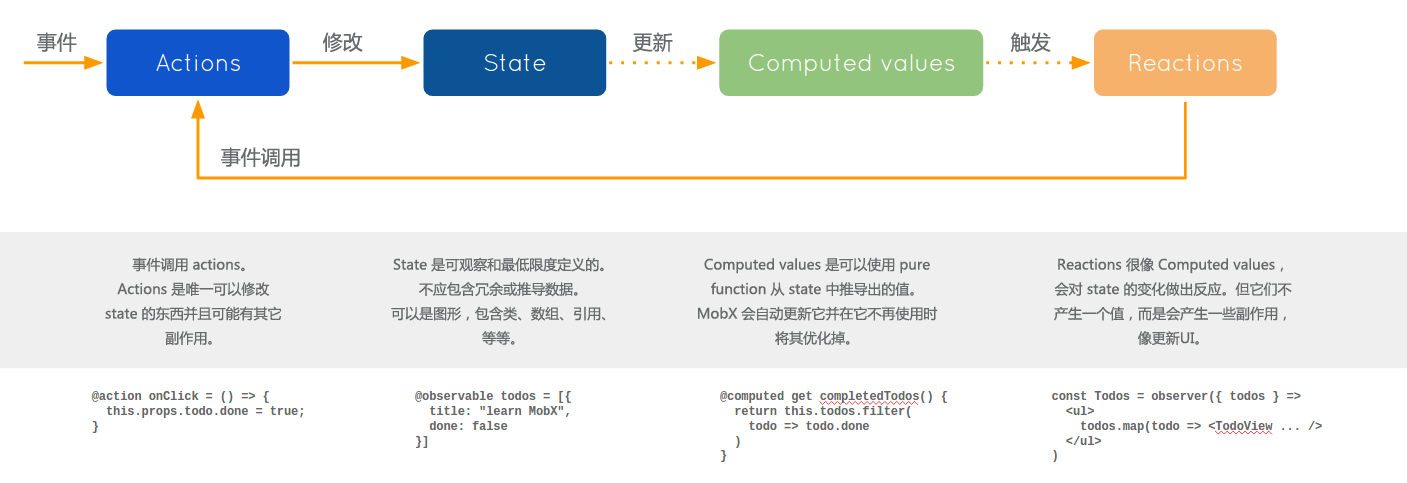
MobX 是一个经过战火洗礼的库, 它通过透明的函数响应式编程 (transparently applying functional reactive programming - TFRP) 使得状态管理变得简单和可扩展。
更多详细介绍,请移步官网细阅。
为什么使用Mobx
React 和 MobX 是一对强力组合。React 通过提供机制把应用状态转换为可渲染组件树并对其进行渲染。而MobX提供机制来存储和更新应用状态供 React 使用。 ——官方文档
可能我们都比较熟悉Redux,简而言之Mobx是比Redux更有力的和React结合使用的助手。
如何使用
下面我们就用一个例子简单的使用Mobx——ToDOList.代码地址 由于没有和parcel使用初探的代码分离,所以,希望你也能看的明白
编辑器 VSCode
编辑器配置
为了使用Es.next的装饰器语言@,需要配置VsCode,具体——如何(不)使用装饰器
依赖 1 2 3 4 5 6 7 //package.json file setup: "dependencies": { "mobx": "^3.4.1", "mobx-react": "^4.3.5", "react": "^16.2.0", "react-dom": "^16.2.0" }
1 2 3 4 5 6 7 8 9 10 //package.json file setup: "devDependencies": { "babel-cli": "^6.26.0", "babel-plugin-transform-decorators-legacy": "^1.3.4", "babel-preset-env": "^1.6.1", "babel-preset-es2015": "^6.24.1", "babel-preset-react": "^6.24.1", "babel-preset-stage-1": "^6.24.1", "mobx-react-devtools": "^4.2.15", }
配置 1 2 3 4 5 6 7 8 9 10 11 12 //.babelrc file setup: { "presets": [ "env", "react", "es2015", "stage-1" ], "plugins": [ "transform-decorators-legacy" ] }
代码 store 创建 1 2 3 4 5 6 7 8 9 10 11 12 13 14 15 16 17 18 19 20 21 22 23 24 25 26 27 28 29 30 31 32 33 34 35 36 37 import { observable, autorun, computed, action } from 'mobx'; class toDo { id = Math.random(); @observable title = ''; @observable completed = false; } class todoStore { @observable todos = []; @computed get completedCount() { return this.todos.filter(todo => todo.completed).length; } @computed get totalCount() { return this.todos.length; } @action.bound toggleCompleted(id) { this.todos.forEach(todo => { if (todo.id === id) todo.completed = !todo.completed; }) } @action.bound addToDo(title) { if (!title) return alert('please input something...'); let todo = new toDo(); todo.title = title; this.todos.push(todo); } }; const store = new todoStore(); export { store }
ToDo组件 1 2 3 4 5 6 7 8 9 10 11 12 13 14 15 16 17 18 19 20 21 22 23 24 25 26 27 28 29 30 31 import React, { Component } from 'react'; import { observer } from "mobx-react"; import { store } from '../../store' import './style.css' @observer export default class ToDo extends Component { constructor(props) { super(props); } render() { const { title, id, completed } = this.props; return (<div className={`todo ${completed ? 'completed' : ''}`} onClick={() => store.toggleCompleted(id)} > {title} </div>); } } //style.css .todo{ background-color: white; text-align: center; font-size: 30px; margin: 3px; } .todo.completed{ background-color: brown; }
App.js 1 2 3 4 5 6 7 8 9 10 11 12 13 14 15 16 17 18 19 20 21 22 23 24 25 26 27 28 29 30 31 32 33 34 35 36 37 38 39 import React, { Component } from 'react' import { observer } from "mobx-react"; import DevTools from 'mobx-react-devtools' import ToDo from './components/ToDo' import { store } from './store' const TEXT = 'please input something...'; const ToDoList = ({ todos }) => todos.map(t => <ToDo key={t.id} {...t} />); @observer export default class App extends Component { constructor(props) { super(props); this.state = { title: '' } } render() { const { title } = this.state; const { todos, totalCount, completedCount } = store; return (<div className="APP"> <input style={{ width: 300 }} placeholder={TEXT} value={title} onChange={e => this.setState({ title: e.currentTarget.value })} /> <button onClick={() => { store.addToDo(title); this.setState({ title: '' }); }}>Add one ToDo</button> <div>{`total count:${totalCount}`}</div> <div>{`total completed count:${completedCount}`}</div> <ToDoList todos={todos} /> <DevTools /> </div>); } }
效果图